






AI has made it easier to generate interfaces quickly, which has led some teams to underestimate the designer’s role. But the truth is: In an AI-driven world, the designer’s role as an architect and curator has never been more critical.
We’ve seen the high-speed demos: a single text prompt generates a landing page in seconds using tools like Claude Design. But anyone who builds real-world, production-ready products knows that a generic AI-generated layout may look convincing, but it often lacks the constraints that make software usable, accessible, and maintainable. It lacks structural integrity, ignores critical accessibility standards, and is a complete nightmare for developers to interpret.
At Stack Builders, we don’t view AI-assisted design tools as replacements for product discovery, UX strategy, UI design, accessibility review, or engineering judgment. We view them as high-speed execution engines that require an expert director. This article serves as a blueprint and roadmap for how we are reinventing the product development lifecycle.
The "Source of Truth" Problem
AI doesn't "know" your brand. It doesn't understand your specific accessibility requirements, your unique user personas, or your technical constraints. If you give Claude a generic prompt, you get a generic result.
The real magic happens when you treat Claude Design as a collaborator by loading your Design System into its context. By providing Claude with your primitives, semantic tokens, and custom component logic, you move from guessing to engineering.
- Input: A disorganized request.
- Output: A visual hallucination that developers can't build.
- Input (The Designer’s Way): A structured prompt backed by a JSON of your design tokens and a library of your custom components.
- Output (The Designer’s Way): A high-fidelity, production-ready interface that is closer to brand and implementation standards.
Why AI Makes Design Systems More Important
Imagine you need to build a complex dashboard with 20 different data states. Manually designing every edge case in Figma takes days.
By loading your custom component library into Claude, a designer can use the AI to iterate on layouts rapidly. But the designer is still making the critical decisions:
- Curation: Which layout handles data density best?
- Accessibility: Is the contrast ratio compliant with our foundations?
- Consistency: Does this new pattern align with the "Atomic Design" logic we’ve established?
Claude provides the velocity, but the designer provides the validity.
What If Design Was Already Code?
Great design is becoming the ultimate competitive advantage. To capture it, we must shift our paradigm: Stop translating screens and start synchronizing data layers.
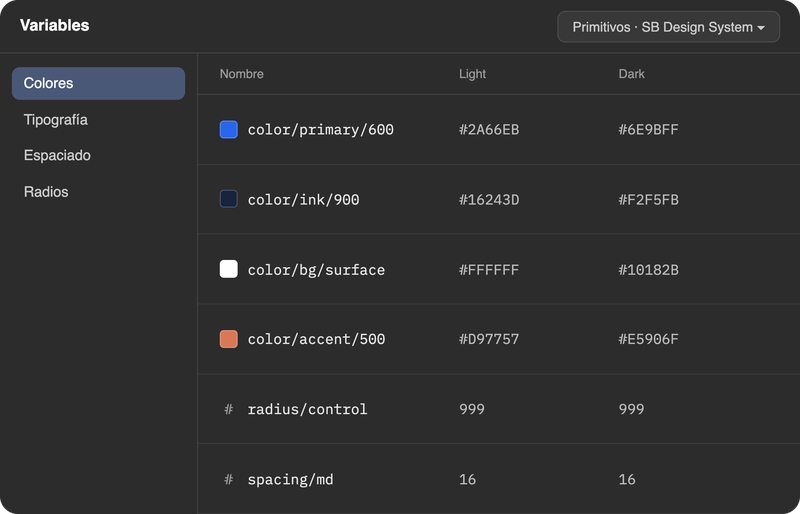
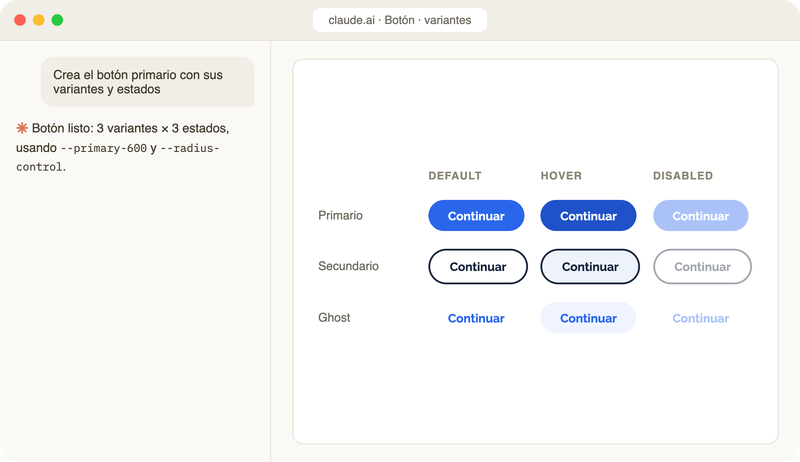
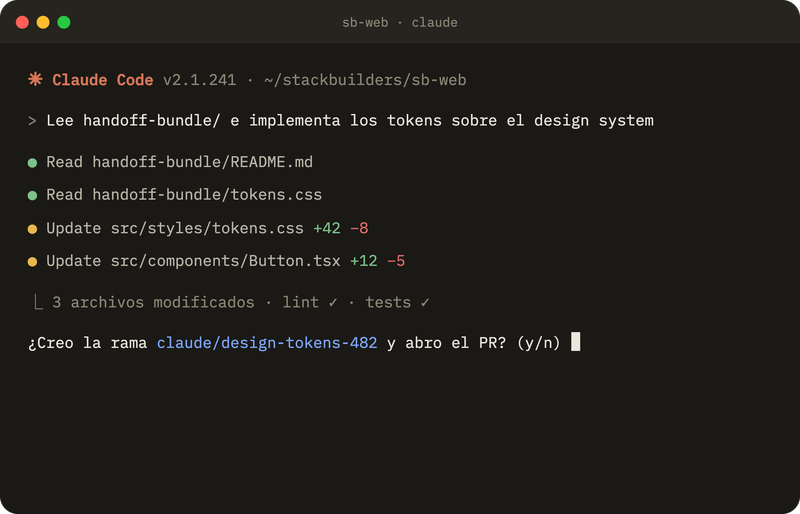
We don't use AI to draw random layouts; we use it to establish a live data pipeline where design intent flows instantly into code. Assisted by Anthropic's Model Context Protocol (MCP), we’ve engineered an integrated, 3-stage ecosystem:
[Stage 1: Figma]
(tokens.json)
[Stage 2: Claude Design]
(Conversational Design and Handoff Bundle)
[Stage 3: Claude Code]
Why AI Needs "Designers-in-the-Loop"
Tools like Claude are excellent at interpolation (filling in the gaps) but struggle with innovation (creating something truly new and solving a unique problem).
- Designers Manage Complexity: AI struggles to balance the needs of multiple stakeholders or complex user flows. A designer understands the nuance of why a button should be in a specific place based on user research.
- Designers Ensure Implementation: As we discussed in our post about "The Bridge," a design is only as good as its code. Designers ensure that what Claude generates is actually buildable within the existing technical architecture.
The Reality: AI isn't going to take your job. A designer who knows how to direct AI will replace the designer who doesn't.
The Future is Collaborative, Not Automated
The "effortless" experience we keep talking about in this series isn't created by a machine. It’s created by humans using machines to work smarter. By using Claude to handle the repetitive "assembly" of components, designers can spend more time on what actually matters: Strategy, Empathy, and Problem Solving.
Design is not dead. It’s evolving. We are moving from being "pixel pushers" to being Experience Orchestrators.
The "Director" Checklist
When using AI tools like Claude for design, ask yourself:
- [ ] Context: Have I provided the AI with our specific design system tokens?
- [ ] Constraint: Have I defined the technical limits (e.g., using only our custom components)?
- [ ] Curation: Did I audit the output for brand alignment and accessibility?
- [ ] Intent: Does this generated layout actually solve the user's primary goal?
The tools are getting faster, but the goal remains the same: creating a product that solves a problem and feels effortless. Whether we use a pencil, Figma, or Claude, the competitive advantage will always be the human intent behind the design.
If you want to bring this level of design maturity, speed, and technical efficiency to your organization today, explore our Stack Builders Design Services.
Let's stop fighting the medium and start mastering the partnership.