






The Crisis in Web Metrics

In the current digital landscape, we are facing a significant integrity crisis regarding web data. Research indicates that around half of global web traffic originates from bots rather than human users. This automated traffic does more than just browse — it inflates sessions, skews conversion rates, and pollutes the metrics that stakeholders rely on to measure real product impact.
For years, developers relied on traditional filters like User-Agent strings or IP blacklisting. However, modern bots have become sophisticated enough to mimic these identifiers, rendering traditional defenses ineffective. To regain trust in our business insights, we need a smarter, behavior-based approach.
Architecture Overview
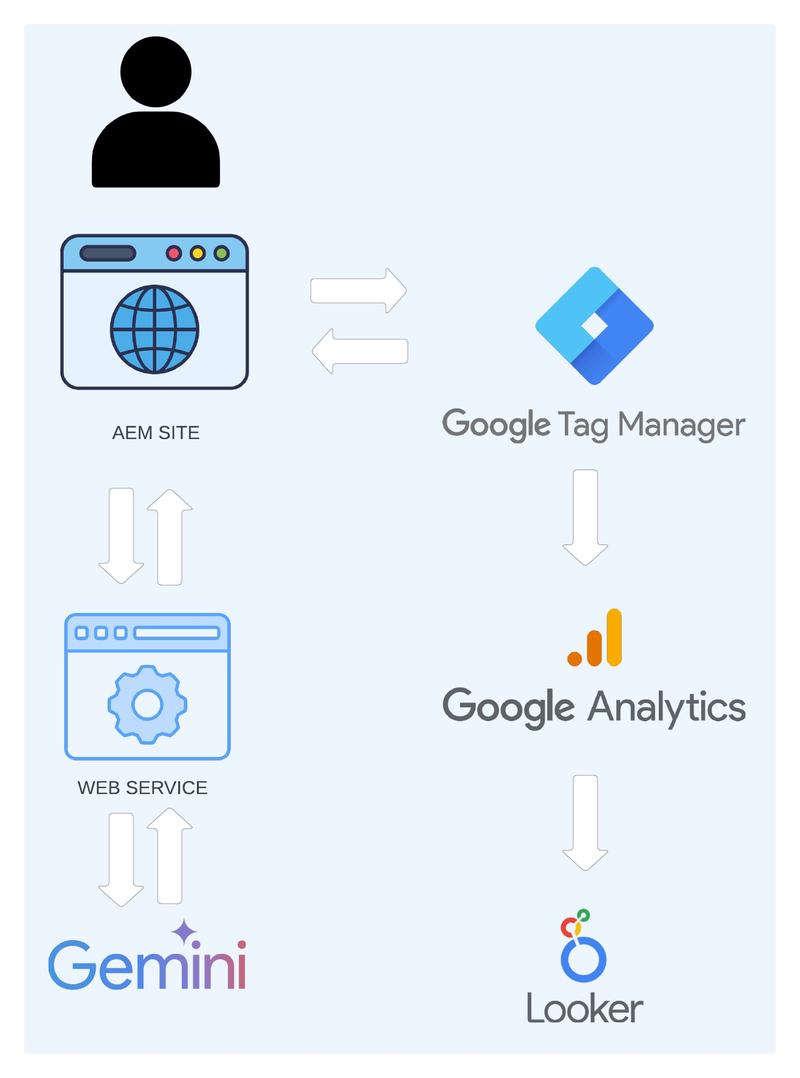
Solving this problem requires an end-to-end pipeline that moves from signal capture to AI classification, and finally to visualization. The proposed architecture consists of four key stages:
- The JS Tag (Collection): A lightweight script on the website collects non-PII (Personally Identifiable Information) behavioral signals.
- Web Service & Gemini (Classification): These signals are sent to a backend service where Gemini AI analyzes the patterns to provide a classification.
- GTM & GA4 (Integration): The classification result is pushed to the dataLayer, where Google Tag Manager (GTM) picks it up and sends a custom event to Google Analytics 4 (GA4).
- Looker Studio (Visualization): Cleaned metrics are displayed in a dashboard for stakeholder review.
Capturing Behavioral Signals (Non-PII)
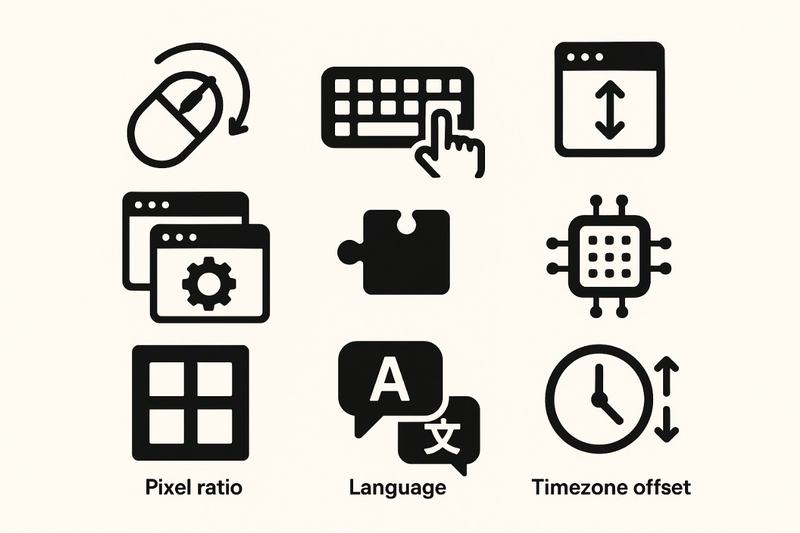
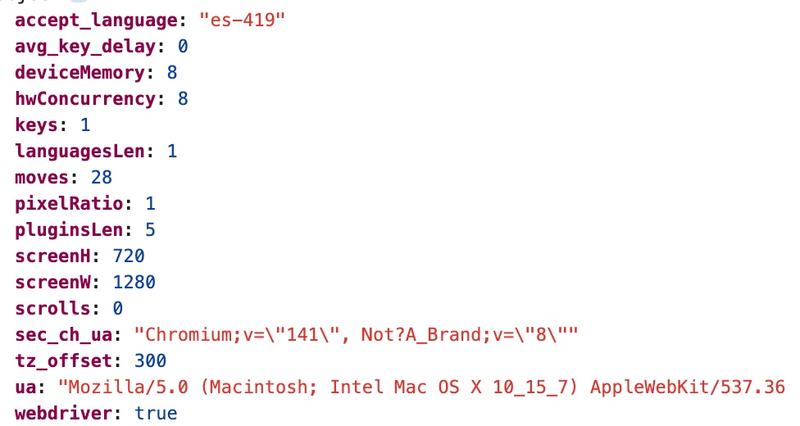
The key to identifying a bot isn't who they are, but how they behave. We focus on non-PII signals to maintain user privacy while capturing high-intent data. Key signals include:
- Interaction patterns: Mouse movements, touch events, keyboard interactions, and scroll depth.
- Hardware signatures: Device memory, hardware concurrency (CPU cores), and pixel ratios.
- Environment context: Timezone offsets, language settings, and plugin configurations.
For example, a "user" who interacts with a button within two seconds of landing but shows zero mouse movement or scroll activity is a high-probability bot.
Implementation
Capturing and optimizing the flow to classify traffic effectively, we need to capture behavioral data that bots find difficult to spoof consistently. However, we shouldn't query the AI on every page load — that would be expensive and redundant.
Instead, we implement "check-once" logic using localStorage. This ensures we only perform the heavy lifting once per session, persisting the result in the browser for future page views.
localStorage is used instead of cookies because AI results can be large. Cookies are sent with every HTTP request, adding unnecessary overhead. localStorage keeps this data client-side and only available to the scripts that need it.
Client-Side Logic
const CLASSIFICATION_KEY = 'traffic_type';
const EXPIRATION_TIME = 3600000; // 1-hour cache

const getTrafficClassification = async () => {
  const cached = JSON.parse(localStorage.getItem(CLASSIFICATION_KEY));
  const now = new Date().getTime();

  // 1. Check for recent cached classification
  if (cached && (now - cached.timestamp < EXPIRATION_TIME)) {
    pushToDataLayer(cached.data);
    return;
  }

  // 2. Capture signals if no cache exists
  const signals = {
    ram: navigator.deviceMemory || 'unknown',
    cores: navigator.hardwareConcurrency || 'unknown',
    timezone: Intl.DateTimeFormat().resolvedOptions().timeZone,
    hasMouseMoved: false,
    // ... additional signal listeners
  };

  // 3. Request AI classification from our backend
  try {
    const response = await fetch('/api/validate-traffic', {
      method: 'POST',
      body: JSON.stringify(signals)
    });
    const aiData = await response.json();

    // 4. Store result and update GTM
    localStorage.setItem(CLASSIFICATION_KEY, JSON.stringify({
      data: aiData,
      timestamp: now
    }));
    pushToDataLayer(aiData);
  } catch (error) {
    console.error("Validation error:", error);
  }
};
The Gemini Brain
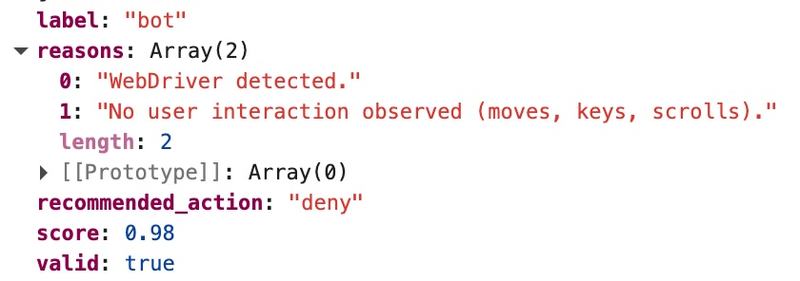
Once the backend service receives these behavioral signals, Gemini AI performs a multi-dimensional analysis. Unlike a static rule-set, the AI can weigh conflicting signals — such as a human-like RAM signature paired with a non-human interaction speed — to provide a nuanced output:
- Classification: Labeled clearly as HUMAN or BOT.
- Risk Score: A numerical value (1–10) representing the confidence level.
- Reasons: Three justifications, such as "inconsistent hardware signatures" or "automated navigation patterns."
```python import google.generativeai as genai
def classify_traffic(signals): model = genai.GenerativeModel('gemini-1.5-flash') prompt = f""" Analyze the following browser signals for signs of automated bot behavior vs. human interaction:
Respond in JSON format:
{{
  "label": "HUMAN" | "BOT",
  "risk_score": 0-10,
  "reasons": ["reason 1", "reason 2", "reason 3"]
}}
"""
response = model.generate_content(prompt)
return response.text
Pro-Tip: Can a Bot Spoof the Classification?
Since localStorage is client-side, a sophisticated bot could theoretically overwrite the result to "HUMAN". However, for most analytics use cases, this is a non-issue — generic bots rarely target site-specific logic.
The Fix: For high-security needs, have your backend return a digitally signed token (like a JWT). This ensures that if a bot tampers with the data, the signature will fail and the classification will be rejected.
Analytics Integration: Putting Data to Work
Classification is only useful if it reaches your reporting tools. We push the AI's response into the browser's dataLayer. From there, GTM triggers a custom event in GA4 every time a session is classified.
const pushToDataLayer = (data) => {
  window.dataLayer = window.dataLayer || [];
  window.dataLayer.push({
    'event': 'traffic_classified',
    'traffic_label': data.label,
    'traffic_risk_score': data.risk_score,
    'traffic_reason': data.reasons[0]
  });
};
This integrated data allows you to:
- Filter Bots: Create segments in GA4 to view metrics only for "Human" traffic.
- Detect Fraud: Identify scraping attempts or scripted interactions in near real-time — a fraud-detection mindset we also apply in other domains, like computer vision for financial document review.
- Visualize in Looker Studio: Create a dashboard that shows your "Purity Score" and filters out noise from stakeholders' views.
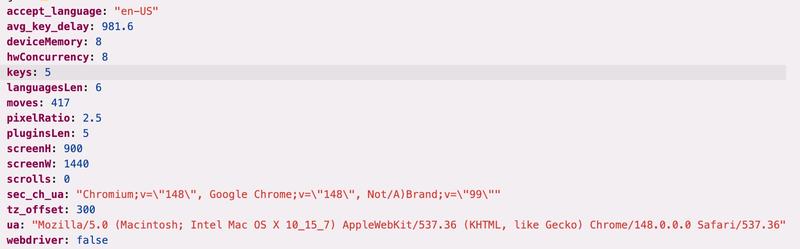
Results
Conclusion
In a data-driven world, data hygiene is a competitive advantage. Clean data equals better decisions. By integrating AI into our analytics pipeline, we move beyond reactive filters and toward proactive data integrity — the same rigor we apply when evaluating AI-generated outputs across our projects.
Implementing an AI-powered traffic classifier ensures that when you see a spike in conversions, you can be certain it represents real growth — not just a smarter script.