


Introduction: The Challenge of Scaling Culture
Employee recognition plays a critical role in workplace engagement. According to a report by Gallup, employees who receive regular recognition are significantly more likely to be engaged and productive at work. Simple moments—like celebrating birthdays or work anniversaries—can reinforce a sense of belonging and appreciation within a team. This becomes even more important in remote or distributed workplaces where everyday interactions are limited.
However, as organizations grow, keeping track of these milestones becomes increasingly difficult. Many HR teams rely on spreadsheets, calendar reminders, or manual Slack messages to ensure no celebration is missed. Over time, this process introduces friction and can lead to repetitive administrative overhead—requiring teams to constantly track dates, draft messages, and coordinate announcements.
Automation might seem like the obvious solution. But there’s an important challenge: if announcements are fully automated, they can start to feel impersonal, which defeats the purpose of recognizing people in the first place.
This raises an interesting question: how can organizations automate milestone announcements while still preserving the human touch that makes them meaningful?
That question became the starting point for building a simple Slack announcement assistant using the Deno Slack SDK.
Challenges & Strategic Trade-offs
Building an internal automation tool might sound straightforward at first: track dates, trigger a message, and post it to Slack. In practice, designing a system that supports HR teams while preserving the emotional value of employee recognition introduces several nuanced challenges.
Balancing Automation with Empathy
One of the first design decisions we faced was how much automation was too much.
A fully automated system could easily post birthday or anniversary announcements without any human intervention. While this would reduce HR's operational workload, it would also remove the personal element that makes recognition meaningful.
Instead of replacing the human step, we designed the bot to act as an assistant rather than an announcer.
The system:
- Surfaces upcoming events automatically
- Generates message templates
- Enables previews and scheduling
…but always keeps HR in control of the final message.
This design choice is reflected directly in the workflow architecture:
const CreateAnnouncementWorkflow = DefineWorkflow({
  callback_id: "create_announcement_workflow",
  title: "Create Birthday/Anniversary Announcement",
  input_parameters: {
    properties: {
      celebrationType: { type: Schema.types.string },
      recipientName: { type: Schema.types.string },
      celebrationDate: { type: Schema.types.string },
      celebrationYears: { type: Schema.types.string },
      interactivity: { type: Schema.slack.types.interactivity },
    },
    required: ["celebrationType", "recipientName", "interactivity"],
  },
});
The key detail here is the interactivity input parameter—a Slack-provided object that carries the context (such as pointers required to open modals and handle submissions). Instead of executing immediately, the workflow pauses and waits for user interaction—ensuring that every announcement goes through a human review step.
Navigating Platform Constraints
Working with Slack’s hosted platform introduced additional constraints:
- Execution time limits
- Limited compatibility with some Node.js libraries
- A need for lightweight, fast workflows
Rather than fighting these constraints, we leaned into them:
- Using native Deno-compatible modules
- Writing small utility functions where needed
- Keeping workflows focused and modular
Another challenge stemmed from the lack of a true staging environment. While the Slack CLI provides a local development experience, certain behaviors—particularly those tied to the hosted runtime—cannot always be fully replicated locally.
For example, updates to the app’s runtime or dependencies were not consistently reflected in the local environment, even when following documented workflows. In some cases, changes that appeared to fail locally behaved correctly once deployed to Slack’s managed infrastructure.
This created a gap between local testing and production behavior, making it difficult to confidently validate changes before deployment. As a result, adopting a staging-like workflow—deploying changes to a controlled Slack environment for validation—became an important part of the development process.
This approach helped surface issues that only occur in a production-like environment, improving reliability and reducing the risk of unexpected behavior in live workflows.
This resulted in a system that is well-aligned with Slack’s platform constraints and simpler to maintain compared to alternative approaches. An early option involved building an external service (for example, using Python) to manage events and send announcements via Slack APIs. However, leveraging Slack-native workflows and the Deno runtime eliminates the need for separate infrastructure, reduces integration complexity, and keeps the entire process within a single, cohesive system.
Why Deno for Slack?
Slack’s next-generation platform, built on modern Slack apps with granular permissions and workflow-based execution, provides a fundamentally different development experience compared to traditional Slack apps.
It’s also worth noting that Deno has evolved significantly in recent years. While early versions introduced a new ecosystem with limited compatibility, the runtime has since added first-class support for Node.js and npm packages. This shift makes it much easier for developers to adopt Deno in real-world projects without sacrificing access to the broader JavaScript ecosystem.
TypeScript by Default
Deno includes first-class TypeScript support out of the box, which allowed us to define structured inputs, workflows, and datastores with confidence.
This eliminates the need for additional build tooling and improves developer productivity by enabling:
- Static typing
- Improved IDE support
- Safer refactoring
Given that most Slack workflows rely heavily on structured data, TypeScript types significantly reduce runtime errors.
Security-First Runtime
Deno was designed with security as a core principle.
Unlike traditional runtimes, Deno enforces explicit permissions, which aligns well with internal tools that interact with employee data.
Within Slack’s managed environment, this contributes to a more secure execution model, particularly for internal tooling that interacts with employee data.
Managed Infrastructure
Perhaps the biggest advantage is that there is no infrastructure to manage. Slack handles:
- Execution
- Scaling
- Authentication
- Managed data storage via built-in datastores
This allowed us to focus entirely on user experience and workflow design.
Architecting the Assistant
Instead of building a command-based bot, we designed the system around Slack Workflows as the core abstraction. This decision was driven primarily by the needs of our end users—HR team members—who prefer a guided, interactive experience over remembering and typing slash commands. Workflows allow us to present structured steps, modals, and previews, making the process more intuitive while also simplifying how we manage state and orchestration on the development side.
Workflow-Centric Design
At the center of the system is a workflow that orchestrates the entire announcement lifecycle:
const formStep = CreateAnnouncementWorkflow.addStep(
  CreateAnnouncementFunction,
  {
    interactivity: CreateAnnouncementWorkflow.inputs.interactivity,
    recipientName: CreateAnnouncementWorkflow.inputs.recipientName,
    celebrationType: CreateAnnouncementWorkflow.inputs.celebrationType,
    celebrationDate: CreateAnnouncementWorkflow.inputs.celebrationDate,
    celebrationYears: CreateAnnouncementWorkflow.inputs.celebrationYears,
  }
);

CreateAnnouncementWorkflow.addStep(
  PostSummaryFunction,
  {
    announcements: formStep.outputs.announcements,
    channel: formStep.outputs.channel,
    message_ts: formStep.outputs.message_ts,
  }
);
This structure highlights an important pattern:
- Step 1 → human interaction (modal + preview)
- Step 2 → system feedback (confirmation + summary)
Workflows act as the glue that connects UI, logic, and persistence.
Functions: The Logic Layer
Within each workflow, custom functions handle the actual logic.
These functions are responsible for tasks like:
- Fetching upcoming anniversaries
- Calculating employee tenure
- Formatting message templates
- Scheduling Slack messages
Because workflows are declarative, functions provide the flexibility needed to implement business rules.
Example pseudocode:
export const CreateAnnouncementFunction = SlackFunction(
  FormFunctionDefinition,
  async ({ inputs, client, env }) => {
    // Lookup user and prepare announcement details
    const user = await lookupUserByName(client, inputs.recipientName);
    const message = formatMessage(
      user.id,
      inputs.celebrationType,
      inputs.celebrationYears
    );

    // Open modal for user to review and schedule
    const modalResponse = await client.views.open({
      interactivity_pointer: inputs.interactivity.interactivity_pointer,
      view: buildModalView("Create Announcement", formBlocks, metadata),
    });

    return { completed: false };
  }
)
  .addViewSubmissionHandler(PREVIEW_CALLBACK_ID, async ({ body, client }) => {
    const { recipient, channels, message, date, icon } = extractMetadata(body);
    const postAt = Math.floor(date / 1000);

    // Schedule message to each channel
    for (const channel of channels) {
      await client.chat.scheduleMessage({
        channel,
        post_at: postAt,
        text: message,
        blocks: [{ type: "section", text: { type: "mrkdwn", text: message } }],
        icon_emoji: icon,
      });
    }

    return {
      outputs: {
        recipient,
        channels,
        message,
        date: postAt,
        success: true,
      },
    };
  });
Triggers: Waking Up the Bot
The system uses two types of triggers to balance automation and interaction.
Scheduled Triggers (Proactive)
Instead of relying on HR to manually check events, a scheduled trigger runs weekly:
const UpcomingEventsTrigger: Trigger = {
  type: TriggerTypes.Scheduled,
  workflow: "#/workflows/fetch_events_workflow",
  inputs: {
    daysAhead: { value: "8" },
    channelId: { value: process.env.NOTIFICATION_CHANNEL_ID },
  },
  schedule: {
    frequency: {
      type: "weekly",
      repeats_every: 1,
      on_days: ["Wednesday"],
    },
  },
};
This design ensures:
- Events are surfaced consistently
- HR has enough lead time (8 days)
- No manual tracking is required
Link Triggers (Interactive)
Once upcoming events are shown in Slack, HR can take action directly from the message using link triggers:
const CreateAnnouncementLinkTrigger: Trigger = {
  type: TriggerTypes.Shortcut,
  workflow: "#/workflows/create_announcement_workflow",
  inputs: {
    created_by: { value: TriggerContextData.Shortcut.user_id },
    interactivity: { value: TriggerContextData.Shortcut.interactivity },
    celebrationType: { customizable: true },
    recipientName: { customizable: true },
    celebrationDate: { customizable: true },
    celebrationYears: { customizable: true },
  },
};
Each button dynamically injects employee data into the workflow, eliminating manual input and reducing friction.
End-to-End Flow
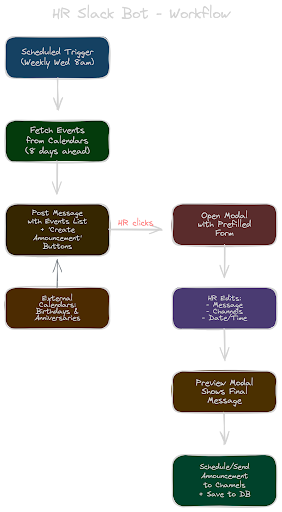
Together, these components create a complete system:
↓
Fetch Upcoming Events
↓
Show upcoming events in Slack (with interactive buttons)
↓
User clicks "Create Announcement"
↓
Link Trigger
↓
Workflow
↓
Function (modal → preview → schedule)
↓
Datastores
Step-by-Step Development Journey
Building the assistant was an iterative process that combined Slack platform features with custom logic.
Here’s how the development unfolded.
Step 1: Setting Up the Environment
Using the Slack CLI with Deno:
slack create stackiversary-bot --template https://github.com/slack-samples/deno-announcement-bot
cd stackiversary-bot
slack-cli run
This provides a fast way to scaffold workflows, functions, and triggers.
Step 2: Defining the Schema
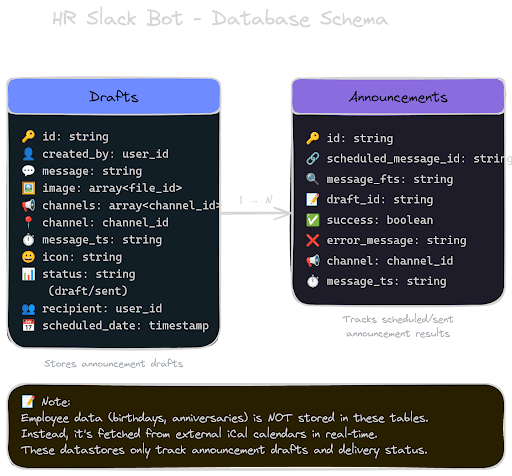
Instead of a single table, we designed two datastores to reflect the lifecycle of an announcement:
export const DraftsDatastore = DefineDatastore({
  name: "drafts",
  primary_key: "id",
  attributes: {
    created_by: { type: Schema.slack.types.user_id },
    recipient: { type: Schema.slack.types.user_id },
    message: { type: Schema.types.string },
    channels: {
      type: Schema.types.array,
      items: { type: Schema.slack.types.channel_id },
    },
    scheduled_date: { type: Schema.slack.types.timestamp },
    status: { type: Schema.types.string },
  },
});
export const AnnouncementsDatastore = DefineDatastore({
  name: "announcements",
  primary_key: "id",
  attributes: {
    draft_id: { type: Schema.types.string },
    channel: { type: Schema.slack.types.channel_id },
    scheduled_message_id: { type: Schema.types.string },
    success: { type: Schema.types.boolean },
    error_message: { type: Schema.types.string },
    message_ts: { type: Schema.types.string },
  },
});
This separation allows us to:
- Support editable drafts
- Track delivery across channels
- Maintain a full audit trail.
The datastores only track the creation, scheduling, and delivery status of announcements.
Step 3: Crafting the UI with Block Kit
User experience was critical. Slack’s Block Kit framework allows developers to build rich interactive messages and modals. Using Slack Block Kit, we built:
- A form modal (input + customization)
- A preview modal (review before sending)
- A success confirmation view
This reinforces the idea that announcements are reviewed, not automated blindly. The image shown below demonstrates the workflow in action:
- Upcoming milestones are displayed
- HR selects the announcement to create
- A modal preview appears
- The message can be edited before sending
This interactive flow makes the process feel intuitive and human-centered.
Step 4: Handling the Full Announcement Lifecycle
The core logic lives in a Slack function that manages the full interaction flow:
Form Submission & Validation
const formData = extractFormValues(body.view.state.values);
const errors = validateFormInputs(formData);

const isNonWorkingDay = await checkCalendar(formData.date);
This ensures: valid inputs, no scheduling on weekends, and consistent formatting.
Scheduling & Persistence
const response = await client.chat.scheduleMessage({
  channel: channel,
  post_at: metadata.scheduledTime,
  text: metadata.message,
});

await saveAnnouncement(client, response, metadata);
The system supports: multi-channel scheduling, delivery tracking, and datastore persistence.
The final step was implementing the logic responsible for dynamically generating announcement messages.
The bot randomly selects from a pool of pre-written message templates, then injects variables such as:
- Employee Slack mention: <@${name}>
- Ordinal years: <${year}> (e.g., "1st", "2nd", "3rd")
- Celebration type (birthday/anniversary)
Example anniversary template:
🎉 Congratulations, <@${name}>, on your <${year}> work anniversary!
Your leadership, energy, and humor make a real impact every day.
We're so inspired to have you on this journey; here's to many more years!
By selecting from multiple message variations and dynamically injecting these variables, the bot produces varied, context-aware announcements while still allowing HR to personalize the final message before sending.
Conclusion
Celebrating people is a small but powerful part of building a strong company culture—especially in distributed teams.
This project shows that automation doesn’t have to remove the human element. When designed thoughtfully, it can enhance it.
By combining:
- Slack workflows
- The Deno runtime
- Interactive Block Kit interfaces
- Structured data
We were able to build a system that:
- Reduces operational overhead for HR
- Ensures no milestone is missed
- Preserves the emotional value of recognition
Perhaps most importantly, this project highlights how internal automation tools don’t always need to be large or complex to have a meaningful impact.
Sometimes, solving a small operational pain point—like remembering to celebrate someone’s anniversary—can significantly improve both team morale and organizational efficiency.
If a team manages recurring internal processes, Slack’s next-generation platform provides a powerful way to automate them while keeping humans in the loop.
The real value of automation lies not in replacing people, but in freeing them to focus on the moments that matter most.
Future Improvements
There are several opportunities to extend this system further. One potential improvement is making triggers more flexible by allowing HR teams to customize parameters—such as defining a specific date range instead of relying on a fixed lookahead window.
Another direction involves incorporating AI-assisted features. For example, AI-generated imagery could enhance birthday and anniversary announcements, making them more visually engaging. Additionally, AI could assist in refining message content by suggesting improvements or alternative phrasing, while still preserving the human-in-the-loop approach by keeping final approval with HR.
These enhancements would continue to build on the project's core principle: using automation to support meaningful human interactions, rather than replace them.