






Why Single Agents Don't Scale Well
Whenever we’re prototyping an AI application, we begin by creating a single agent that’s in charge of everything, from understanding the request, planning, calling tools, and generating the final response. This is fine for a simple use case, as this is easy to implement.
However, as complexity grows, the agent must manage a lot of different tasks, like validation and multiple tool calls in the same iteration loop. This can make context difficult to debug and understand because everything is happening inside a single model call.
This would mean adding more instructions and tools to our agent that don’t actually fix the structural issue. This increases the complexity and unpredictability of our agent. While single-agent systems are excellent for prototypes, we require multi-step workflows that actually separate responsibilities and are more reliable. This is where multi-agent systems shine and become a more scalable solution in the long term.
What are Multi-Agent Systems (MAS)
A Multi-Agent System "MAS" is an architecture in which multiple agents collaborate to achieve a shared objective. Instead of using a single agent to handle every responsibility, tasks are divided into smaller parts, where each agent focuses on a specific task.
Multi-agent systems patterns
Designing a multi-agent system is about choosing what pattern to use for the problem. There are some common patterns that have emerged to structure collaboration among agents.
Coordinator/Dispatcher Pattern
For this pattern, you have a central agent that acts as an orchestrator, which receives the user request and decides how to delegate the parts needed to complete the task. This orchestrator tasks other agents and gathers the results to produce the final response. The most typical example of this is a customer support chatbot, which delegates requests to particular areas depending on the expertise needed (eg, billing agent, technical support agent) and returns a response to the user's query.
Sequential Pipeline Pattern
Here, you set a linear flow where each agent executes a specific transformation and gives the output to the next agent. Each step depends on the previous one's execution, making the workflow predictable. An example of this can be an agent to make a financial report, where an agent first gets structured data from a file, another analyzes that data, and the final agent gathers all the insights in a report.
Parallel Fan-Out/Gather Pattern
This makes it possible to divide a task into independent subtasks that are executed simultaneously and gathered into a single result at the end. This pattern is perfect to reduce latency in the agent calls. An example of this can be having a research agent that gets multiple documents and summarizes them in parallel, and a final agent consolidates them into an overview.
Hierarchical Task Decomposition
Structures agents into multiple levels of responsibility, where the top agent breaks down the complex objective into manageable components, then all the sub-agents handle the components with the capability to decompose and delegate them further. For example, we can use this pattern for an agent that produces code where the sub-task would look like: creating the actual requirements, designing the solution, implementing the solution, and testing it.
Review/Critique Pattern (Generator-Critic)
We separate the generation from the evaluation; an agent produces an output, and another independently reviews it to see if there are areas of improvement, introducing an internal quality control system. This pattern can be used in code generation, where one agent produces the code and another reviews it for logical flaws, edge cases, security vulnerabilities, etc.
Iterative Refinement Pattern
This allows you to collaborate over multiple cycles to progressively improve an output, permitting other patterns into the mix to obtain a better result. For example, you might have an agent to generate initial article drafts and another agent to evaluate them and give them revisions. You can go through multiple iterations until your revisions don’t have any comments and you have an article that fits your quality criteria.
Human-in-the-Loop Pattern
For this pattern, we allow for human oversight into the workflow at defined checkpoints. The agents perform the task, but a human reviews, adjusts, and approves the output before continuing. This might be necessary in high-risk environments where accountability is crucial. For example, if you have an agent to generate and review a contract, you will still need to go through a lawyer who provides the final touches and approves it for delivery.
Google’s Agent Development Kit 101
Google’s Agent Development Kit, or ADK, is a framework designed to build, orchestrate, and deploy multi-agent systems where structure is prioritized. ADK provides a formal way to define agents instead of having ad hoc solutions. ADK also allows us to define interaction between agents, tool calls, and hierarchies that allow us to benefit from the patterns explained above.
Basic concepts to know about ADK
To actually use ADK, we should be familiar with the basic concepts that enable us to build working agent applications with ADK. The following are the most important things to know about ADK:
Agents
In ADK, an agent is the most atomic unit. They have their own instructions, model configuration, and access to tools.
Tools
Tools in ADK are structured functions that agents can invoke to accomplish a specific task. You can have tools that allow you to search the internet, format information in a particular format, send emails, etc.
Workflows and Orchestration
ADK allows for explicit orchestration. Instead of embedding multi-step reasoning inside a single prompt, ADK allows you to define how agents interact in code through the patterns explained in the previous section.
What about memory and state?
Managing state is a common challenge in AI systems, where you sometimes pass long context prompts that can get overlooked by agents. ADK provides a structured way to handle session state and memory. In this way, agents can maintain contextual information across the whole workflow without relying on prompt accumulation.
How does ADK help with observability?
This visibility is crucial for debugging and auditing. In case of an error in production environments, you need to understand how a result was generated by looking at the steps the agents took. In ADK, this is integrated within the framework, allowing you to see which agent was invoked, what context and tools were used, and how the overall workflow worked.
ADK vs other frameworks
As multi-agent systems become more common, several frameworks have emerged to help developers to implement them. They share similar goals, but they differ in their focus. Comparing ADK with other popular frameworks like LangChain and LangGraph helps us clarify where each of them fits in different projects.
LangChain is one of the most flexible frameworks available. It supports many model providers. This makes it attractive for teams that value vendor neutrality and ecosystem breadth. Despite this, we see that large systems may require additional architectural decisions to allow for maintainability.
LangGraph builds on the LangChain ecosystem by introducing explicit graph-based orchestration. It allows for complex workflows that require different states and workflow management. It’s as flexible as LangChain while offering structural control.
Google ADK takes a more structured and opinionated approach. It encourages architectural clarity and production readiness, but it is closely aligned with Google’s model ecosystem and cloud infrastructure. This makes it a strong option for teams already in that stack; this can limit flexibility for teams that value vendor portability.
In conclusion, ADK focuses on structured design and ecosystem integration. LangChain and LangGraph prioritize flexibility. As with everything in software, the right choice depends on what your project priorities are and what are the constraints you have.
A practical look into a MAS project with ADK
We’ll build a small ADK multi-agent system for expense tracking that helps an individual log transactions, auto-categorize them, track budgets, and generate a monthly summary. The goal is to show how ADK’s agent composition feels in a real project by getting hands-on experience.
This follows ADK’s standard project and root_agent entrypoint, and uses Gemini as an LLM Agent plus a Workflow Agent to orchestrate steps.
Project setup
Create a new ADK agent project and install dependencies.
pip install google-adk
adk create finance_tracker
cd finance_tracker
ADK’s Python quickstart uses google-adk and a root_agent defined in agent.py.
The multi agent design
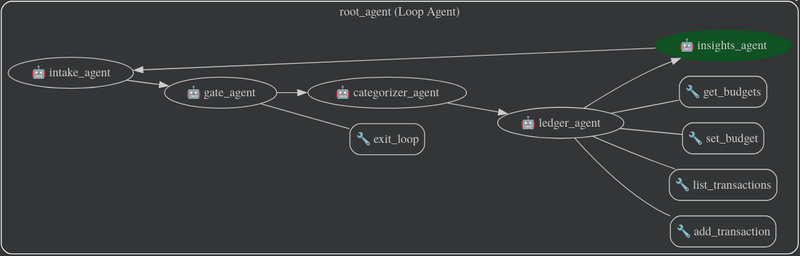
We’ll use these agents:
- Intake agent: turns user text into a clean transaction payload
- Gate agent: this agent is in charge of allowing the actual execution of the flow if all required data is present.
- Categorizer agent: assigns a category to the expense (groceries, rent, transport, etc.)
- Ledger agent: writes and reads transactions using tools, in our case SQLite
- Insights agent: creates summaries and the reports
Then we connect them with a LoopAgent workflow, which is one of ADK’s deterministic Workflow Agents, this allows us to ask the user for clarification in case it is needed. This would look something like this:
Minimal implementation
from __future__ import annotations


import sqlite3
from datetime import datetime
from pathlib import Path
from typing import Any, List, Optional


from google.adk.agents.llm_agent import Agent
from google.adk.agents.loop_agent import LoopAgent
from google.adk.tools import exit_loop


DB_PATH = Path(__file__).with_name("finance.db")


# Simple SQLite-based ledger for transactions and budgets.
# This is a minimal implementation for demonstration purposes.
def _get_conn() -> sqlite3.Connection:
   conn = sqlite3.connect(DB_PATH)
   conn.execute(
       """
       CREATE TABLE IF NOT EXISTS transactions (
           id INTEGER PRIMARY KEY AUTOINCREMENT,
           ts TEXT NOT NULL,
           amount REAL NOT NULL,
           currency TEXT NOT NULL,
           merchant TEXT,
           category TEXT,
           note TEXT
       )
       """
   )
   conn.execute(
       """
       CREATE TABLE IF NOT EXISTS budgets (
           category TEXT PRIMARY KEY,
           monthly_limit REAL NOT NULL,
           currency TEXT NOT NULL
       )
       """
   )
   conn.commit()
   return conn


# Tools (callable functions) that agents can use.
def add_transaction(
   amount: float,
   currency: str = "USD",
   merchant: Optional[str] = None,
   category: Optional[str] = None,
   note: Optional[str] = None,
   ts: Optional[str] = None,
) -> dict:
   """Insert a transaction into the local ledger."""
   conn = _get_conn()
   if ts is None:
       ts = datetime.utcnow().isoformat()
   conn.execute(
       "INSERT INTO transactions (ts, amount, currency, merchant, category, note) VALUES (?, ?, ?, ?, ?, ?)",
       (ts, amount, currency, merchant, category, note),
   )
   conn.commit()
   return {"status": "success", "inserted": True, "ts": ts}


def list_transactions(
   month: Optional[str] = None,
   limit: int = 50,
) -> dict:
   """
   List transactions.
   month format: YYYY-MM, e.g. 2026-02
   """
   conn = _get_conn()
   params: List[Any] = []
   q = "SELECT ts, amount, currency, merchant, category, note FROM transactions"
   if month:
       q += " WHERE substr(ts, 1, 7) = ?"
       params.append(month)
   q += " ORDER BY ts DESC LIMIT ?"
   params.append(limit)


   rows = conn.execute(q, params).fetchall()
   items = [
       {
           "ts": r[0],
           "amount": r[1],
           "currency": r[2],
           "merchant": r[3],
           "category": r[4],
           "note": r[5],
       }
       for r in rows
   ]
   return {"status": "success", "items": items}


def set_budget(category: str, monthly_limit: float, currency: str = "USD") -> dict:
   """Set or update a monthly budget for a category."""
   conn = _get_conn()
   conn.execute(
       "INSERT INTO budgets(category, monthly_limit, currency) VALUES(?, ?, ?) "
       "ON CONFLICT(category) DO UPDATE SET monthly_limit=excluded.monthly_limit, currency=excluded.currency",
       (category, monthly_limit, currency),
   )
   conn.commit()
   return {"status": "success", "category": category, "monthly_limit": monthly_limit, "currency": currency}


def get_budgets() -> dict:
   """Return all configured budgets."""
   conn = _get_conn()
   rows = conn.execute("SELECT category, monthly_limit, currency FROM budgets").fetchall()
   items = [{"category": r[0], "monthly_limit": r[1], "currency": r[2]} for r in rows]
   return {"status": "success", "items": items}


# Agents definitions. Each agent has a specific role and can call tools or other agents as needed.


intake_agent = Agent(
   model="gemini-2.5-flash",
   name="intake_agent",
   description="Extracts transaction details from user messages.",
   instruction=(
       "Turn the user message into a transaction JSON.\n"
       "Required: amount.\n"
       "Optional: currency (default USD), merchant, note.\n\n"
       "If amount is missing or ambiguous, ask ONE short question and output:\n"
       "{ \"complete\": false }\n\n"
       "If ready, output:\n"
       "{ \"complete\": true, \"amount\": <number>, \"currency\": \"USD\", \"merchant\": null|\"...\", \"note\": \"...\" }\n"
       "Merchant may be null. Do not ask for merchant.\n"
   ),
   output_key="tx",
)


gate_agent = Agent(
   model="gemini-2.5-flash",
   name="gate_agent",
   description="Stops the workflow if intake is incomplete.",
   instruction=(
       "Look at tx in state.\n"
       "If tx.complete is false, call the exit_loop tool immediately and output nothing.\n"
       "If tx.complete is true, do nothing."
   ),
   tools=[exit_loop],
)


categorizer_agent = Agent(
   model="gemini-2.5-flash",
   name="categorizer_agent",
   description="Assigns a category to a transaction.",
   instruction=(
       "Given a transaction JSON, assign one category from this list:\n"
       "Groceries, Dining, Rent, Utilities, Transport, Health, Entertainment, Shopping, Income, Other.\n"
       "Output JSON with all original keys plus category."
   ),
)


ledger_agent = Agent(
   model="gemini-2.5-flash",
   name="ledger_agent",
   description="Writes and reads transactions and budgets using tools.",
   instruction=(
       "You manage the personal finance ledger.\n"
       "Use tools to add transactions, list transactions, set budgets, and get budgets.\n"
       "Never invent ledger entries.\n"
       "If asked for a summary, list transactions and budgets first, then compute."
   ),
   tools=[add_transaction, list_transactions, set_budget, get_budgets],
)


insights_agent = Agent(
   model="gemini-2.5-flash",
   name="insights_agent",
   description="Creates summaries and budget insights based on ledger data.",
   instruction=(
       "You produce a short monthly summary with totals by category and budget status.\n"
       "Be concrete, use numbers, and keep recommendations practical.\n"
       "If there is not enough data, say what is missing and suggest the next best action."
   ),
)


# The root agent orchestrates the workflow.
# It runs the intake agent first, then the gate agent to check if we can proceed.
# If the intake is complete, it continues to categorizer, ledger, and insights agents in sequence.
# The max_iterations=1 means it will run through this sequence once per user message.
#
# For a real application, you might want a more complex loop with conditions to
# allow for follow-up questions, corrections, etc.
root_agent = LoopAgent(
   name="root_agent",
   description="Personal finance tracking assistant.",
   sub_agents=[
       intake_agent,
       gate_agent,
       categorizer_agent,
       ledger_agent,
       insights_agent,
   ],
   max_iterations=1,
)
Results
To test the system, we can run the agent using ADK’s development server. From the project root, execute:
adk web
This starts a local web interface, available at http://127.0.0.1:8000, where you can interact with the agent in real time.
The web environment allows you to:
Send natural language prompts
Observe how each agent in the workflow is executed
Inspect tool calls and intermediate outputs
Debug the flow of state between agents
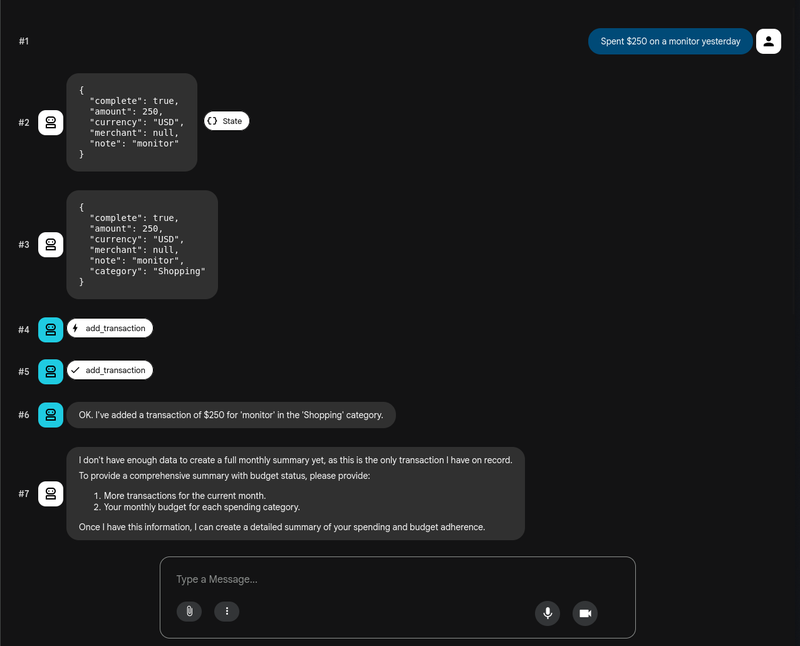
Using a simple prompt such as:
“Spent 250 on a new monitor yesterday.”
We can see the full multi-agent workflow in action, where ADK shows us each agent's output and the tools that are called. We can inspect each request to see, for example, the shared state present between the call of the intake agent and the rest of the agents. Then, this interactive environment is useful during development because it makes the orchestration visible, allowing you to see how each decision is made at each stage.
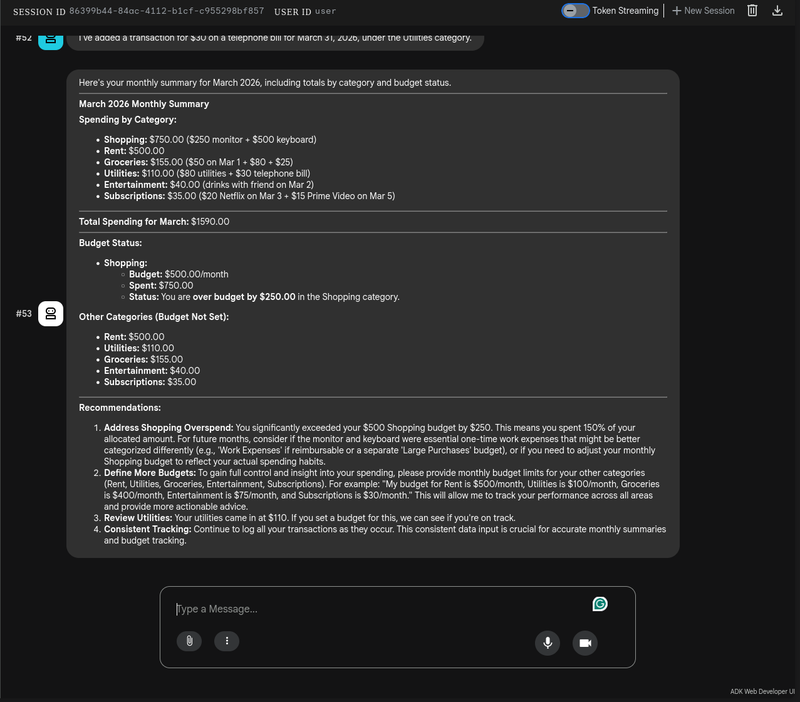
I’ve added more transactions to see how the insight agent behaves once we have enough data to generate a monthly report. This helps us test the flow as a whole, which results on the following:
Conclusion
Multi-agent systems mark a shift from prompt engineering to system design. Rather than asking one large model to act like an entire team, we delegate tasks to specialized agents with clear boundaries and controlled workflows.
With Google’s Agent Development Kit, we can progress beyond experimental setups and create organized systems that are observable, modular, and ready for production. The finance tracker example may seem straightforward, but the underlying structure can scale to much more complex areas.
As AI agents become more embedded in real products, the ability to design systems instead of just prompts will set apart prototypes from actual, used software.